CASE STUDY: To Have Clear and Easily Accessible Documentation
Executive Summary

Addressing concerns over context switching and inconsistent documentation, I wanted to overhaul the documentation structure and process within the Content Platform. Through collaborative efforts, key goals were defined, and tasks were systematically organised on a Trello board. Feedback sessions highlighted challenges in finding and assessing documentation. A new, user-friendly structure was designed and validated through usability testing. Consensus was reached on the organisation approach. Migration strategies, including labelling and archiving criteria, were devised. A validation period ensured transparency in decision-making. A comprehensive documentation standard was established, aiming to improve team efficiency and collaboration.

Background

During retrospectives and discussions with the team, the challenge of context switching emerged repeatedly. A significant obstacle was the difficulty in resuming tasks where they had been left off. This prompted a deeper exploration of our documentation practices, revealing inconsistencies and a lack of clarity in our documentation system across team members. To address this issue and promote transparency within the team, I initiated a project to overhaul our documentation system.

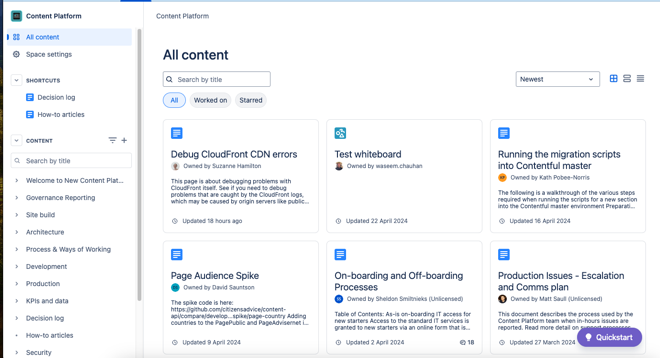
The original confluence documentation for the Content Platform Team

Implementation

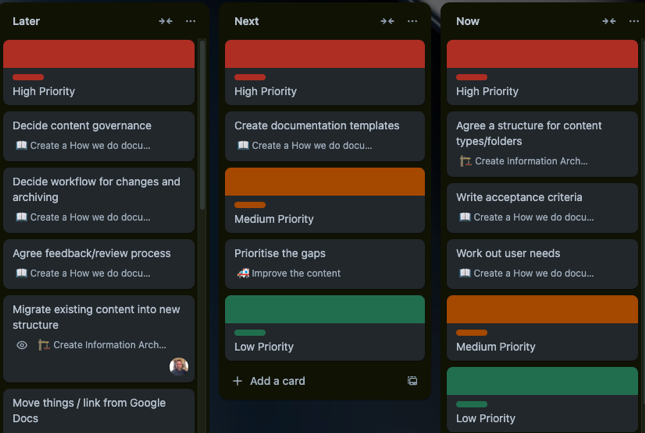
I began by hosting a Documentation kick-off session, where I discussed with key team members their objectives and expectations for enhanced documentation. This collaborative approach ensured that the team’s input was considered in defining the project’s goals and objectives. Additionally, the formation of a dedicated group of individuals, including team members and stakeholders, reflected the agile principle of self-organising teams, empowering individuals to contribute based on their expertise and interest. I then mapped out the necessary steps to achieve these goals through a stepping stones exercise. These identified steps were then transferred to a Trello board, structured into three columns: “now,” “next,” and “later.”. This allowed for incremental progress and continuous refinement of the project plan based on evolving needs and priorities

Trello for the Documentation workshop

I scheduled regular workshop sessions and formed a dedicated group of individuals from both within my team and beyond who expressed interest in contributing to the project. The result of this was a priority ordered now/next/later trello board and a group of individuals who wanted to improve the documentation. As you will read, I ensured we asked for feedback early and often, adjustments could be made iteratively to ensure that the final documentation system met user needs effectively.


Our objective was straightforward: to achieve clear and easily accessible documentation. To bridge the gap between our current state and our desired outcome, I needed to assess the existing situation. To do so, the team developed a set of questions to understand how individuals currently utilise the documentation and their sentiments towards it. Additionally, we inquired about the documentation stored in team members’ personal Google Drives.


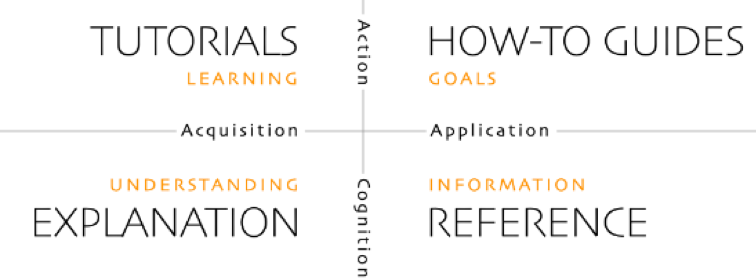
Reviewing these documents provided valuable insights into the challenges individuals faced, particularly regarding the location of specific documentation and uncertainty on how up to date a particular document was. One suggestion that emerged was the reformatting of all documentation using Diátaxis, a framework identifying four distinct needs and corresponding forms of documentation. Diátaxis proposes organising documentation around the structures of these needs, offering a systematic approach to documentation management

Diátaxis framework for documentation

While intriguing, I concluded that this suggestion was beyond the current scope of the project. Nonetheless, I acknowledged its value and made a note to revisit it for future consideration.


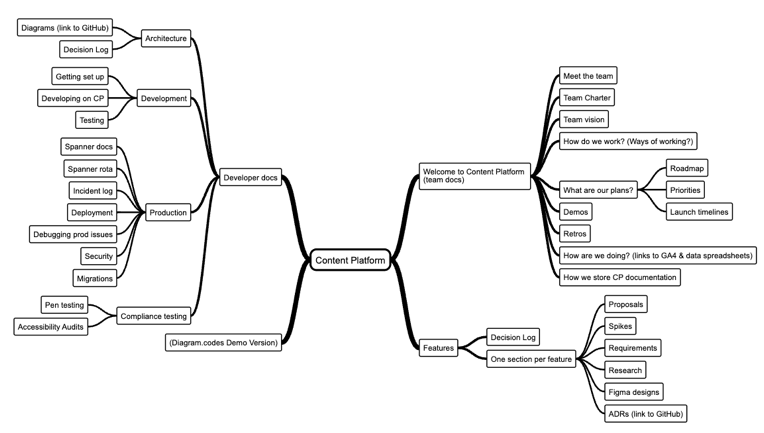
Guided by the insights gathered from our team, we devised a set of new section titles for Confluence. Subsequently, we conducted tree testing to evaluate the accessibility of documentation within this revamped structure.

Visual representation of our new documentation structure

Results from the tree jacking exercise showed around 61% success rate for finding the right index.

We faced a decision regarding the organisation of documentation, with two possible approaches:

Option A: Index & Page types – Indexes solely consist of an index, formatted similarly to an advisernet section page, containing manually-created documentation groups. Pages within this structure contain the actual content.

Option B: Index, Parent & Page types – Index pages are generated using Confluence’s ‘child’ component, where parent pages contain content and have other pages as children. Pages themselves contain content within this arrangement.


Option A offers the advantage of eliminating the need for users to know the exact filing location of documentation, as all documents are visible on the index page. However, this approach requires manual creation of the index and manual addition or deletion of pages from it. Additionally, the index does not align with the sidebar navigation.


Option B offers the advantage of automatic creation and updates of the index using Confluence’s ‘child pages’ component. This aligns the index with the sidebar navigation, minimising the effort required for users to add and index pages. However, users may find it slightly more challenging to locate documents from a parent page. Nonetheless, the index page would still exist and list all documents if preferred for information retrieval.


After creating Confluence mock-ups of both structures, we sought feedback from the team to determine their preferred layout. The results showed that 80% of respondents favoured option A – index, parent, page. As a result, we decided to proceed with this option for the documentation organisation. The preference for Option A, despite its manual aspects, reflected a prioritisation of simplicity and user-friendliness over automation.


With all necessary components in place, I sought clarity on our approach to migrating the documentation. Recognising the magnitude of the task, it was apparent that attempting to move all documentation at once would be impractical. Therefore, I proposed a strategy to tackle the migration process section by section, ensuring a systematic and manageable approach.


We reached a consensus on employing labels to track the progress of document migration and identify those earmarked for archiving. The agreed-upon approach involved initially labelling all pages, indicating both their intended new section and whether they required archiving.


As part of this process, we needed to establish criteria for determining which documents should be archived. We decided to consider various factors, including the creation date and the number of views each page had received. One of the criteria for archiving was set as pages with zero views

Data for a page on Confluence

Once the labelling process was completed, we provided the team with a three-week window to review and confirm the archival status of all labelled pages. Following this validation period, we proceeded to migrate the pages into the new structure as planned.


The final step involved creating a comprehensive document outlining the standards and procedures for documentation management. This document provided clear guidelines on how documentation should be organised, updated, and maintained to ensure consistency and efficiency within the team.

Conclusion

Engaging in open dialogues and involving team members in decision-making processes has been instrumental in identifying challenges, gathering insights, and implementing effective solutions. Additionally, prioritising the needs of end-users through a user-centric approach has proven essential. By actively seeking feedback, conducting usability tests, and incorporating user insights into our decision-making process, we ensure that our solutions are tailored to meet the needs of those who rely on them. By maintaining a positive mindset, embracing flexibility, and persevering in the face of adversity, we’ve been able to drive progress and achieve our goals.

Description

Creating an effective system of Documentation